HP Latex 700 & 800 Media Edge Guards (2 Pack)
HP Media Edge Guards are designed to help maintain consistent, high-quality output on HP Latex 700 and 800 series printers. They keep substrate edges flat and secure, preventing lifting or curling—especially with challenging media or changing environmental conditions.
Key Features
Enhanced Substrate Control
Edge holders extend 6 mm over the substrate to keep media flat throughout the print process. This reduces distortion and helps ensure sharp, accurate results.
RIP Software Margin Settings
Set a minimum margin of 7 mm (0.3 inches) on both sides in your RIP software to prevent printing over the edge holders and protect print quality.
Printer Compatibility
- HP Latex 700 / 700W
- HP Latex 800 / 800W
Why Use HP Media Edge Guards?
When printing on flexible or curl-prone media, even slight edge lift can impact print quality. HP Media Edge Guards provide added stability, helping you achieve cleaner edges, better consistency, and more reliable production across a wide range of materials.
Storage & Handling Guidelines
Proper Storage:
When not in use, store the edge holders inside the printer, to the left and right of the print platen. This prevents accidental substrate jams during media loading.
Media Loading Protocol:
Always park the edge holders in their resting positions (far left and right of the print zone) before beginning media loading.
Only adjust the edge holders to match the media width after the loading process has completed. Premature adjustments may cause media width misreadings and jams.
Accurate Placement:
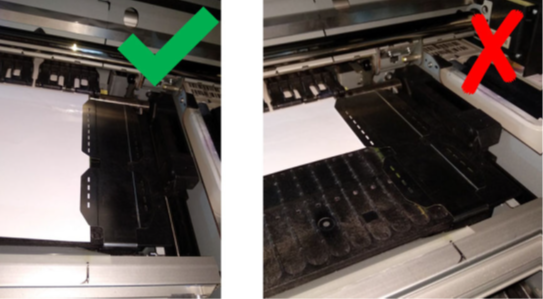
During use, position each edge holder to overlap the substrate’s lateral edges. Align the dotted guideline on each holder with the corresponding edge of the media for precise setup and optimal performance.
As a general rule, HP recommends working without the Media Edge Holders. Use them only if the lateral edges are lifting. The preference would be to use the Take-up-Reel (TUR) in most cases. It allows everything to be flat. Some banner materials do better with the Take-up-Rell versus the edge guards.
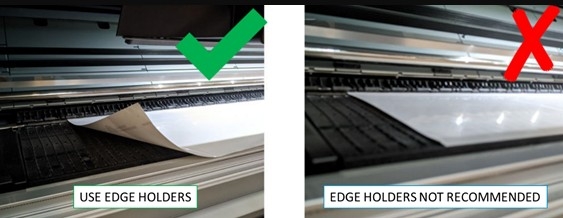
They can be used with the platen or with the ink collector. When not in use, they should be stored outside the printer.
If they are needed often, they can be stored inside the printer, to the left and right of the print platen, to avoid substrate jams when loading the next substrate.
IMPORTANT: If you choose to use them, you should move them into parking position when prompted by the front panel (this prompt appears when the "Use edge holders" checkbox has been checked). Otherwise, the printer may detect the wrong roll width.
NOTE: The edge holders extend 6 mm over the edge of the substrate. You should set a minimum left and right margin of 7 mm (0.3 in) in the RIP when using edge holders, otherwise the printer could try to print on the edge holders.
Parking position:
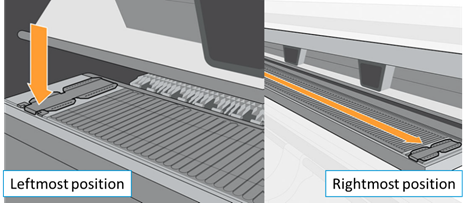
- Edge holders must be in parking position (leftmost and rightmost positions of the print zone) to prevent wrong media width measurements and/or media jams.
- If the edge holders are already installed on the platen in the correct parking position when loading, do not tick the box in the front panel.
- Do not adjust the edge holders to the media width until the media loading process is completely and successfully done.
- The edge holders should be placed on the platen so that they overlap the left and right edges of the substrate. Align the dotted line on the edge holder with the lateral edge of the substrate.
- To avoid possible jams, HP recommends that the substrate’s lateral edge be completely under the edge holder’s surface: